

What Ember does
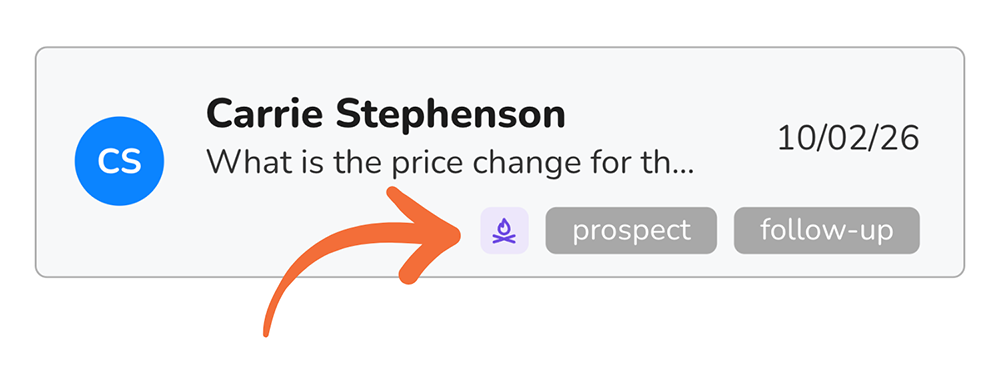
Ember finds open conversations that have had no activity for a set number of days and brings them back to your attention by adding an Ember icon (purple) to the thread. Nothing is sent to your contacts. Ember is a prompt to you and your team.
A conversation becomes an ember when:
it is open (not closed), and
it has had no activity for longer than your profile's threshold (7 days by default).
What counts as activity
A message you or a teammate sends
A message the contact sends
An internal note added to the conversation
The conversation being reassigned
The conversation being closed (see why closing conversations is the goal)
Any of these resets the clock. Opening or reading a conversation does not.
Closing a conversation removes it from Ember.
The morning notification
Once a day at 7:00 am in your time zone, Ember counts your embers and lets you know. If the count is zero, nothing is sent.
Push notification (mobile). You receive one notification, for example: "Ember: 12 conversations have been quiet for 7+ days." It shows the count only, never contact names. Tap it to open your Ember list.
In-app bar (web and mobile). At the top of your inbox, a bar shows the Ember icon and the count: "Ember · 12 threads needing attention."

Click View to see just those conversations.
Click X to dismiss the bar for the day. It comes back the next morning with an updated count.
Dismissing the bar does not change any conversation. The embers are still there; you can reach them any time through the filter or the Ember list.
Finding your embers
The Ember mark. Every ember shows a small purple flame icon on its card in the inbox, next to the conversation's tags. You cannot add or remove this mark yourself. Ember adds it when a conversation goes quiet and clears it as soon as there is activity. Hover over it to see how long the conversation has been quiet.
Filter by Ember
Open the Filter menu above your inbox in the search bar (web and mobile).
In the Tags dropdown, choose Ember.
Click Filter.
The inbox now shows your Embers, oldest first. An Ember chip appears in the search bar; remove it to clear the filter. You can combine Ember with other filters, such as assignee or channel.
Clearing an ember
There are no special Ember actions. Use the normal conversation actions and the ember clears on its own.
Action | What happens |
|---|---|
Reply | The conversation leaves Ember as soon as your message sends. |
Add a note | Counts as activity; the conversation leaves Ember. |
Reassign | Leaves your Ember list. The new owner sees it only if it goes quiet again under them. |
Close | Removed from Ember. |
Not every ember needs a reply. If the conversation is finished, closing it is the right way to clear it.
When you clear the last ember while the filter is on, the list shows an empty state. Remove the Ember filter chip to return to the full inbox.
Settings
Ember settings are per profile. If your account has more than one profile, each profile has its own threshold.
Change how many days until a conversation goes quiet
Go to Profile details.
Find the Ember Timing setting.
Pick a timeframe from 1 to 14 days. The default setting is 7 days.
Save.
The new threshold applies right away to the Ember mark and filter. The next morning's notification uses the new number.
A shorter threshold suits fast-moving sales conversations; a longer one suits support or project work where a week of silence is normal.
Ember and Reminders
Ember and Reminders work together. Reminders are manual: you set a time on a conversation you know needs a follow-up, and it pops to the top of your list when it is due. Ember is automatic: it watches every open conversation and flags the ones that go quiet, including the ones you never thought to set a reminder on.
Reminders | Ember | |
|---|---|---|
Set by | You, per conversation | Automatic, for all open conversations |
Triggers | At the time you chose | After N days with no activity |
Best for | Follow-ups you plan ("call back Tuesday") | Follow-ups you forgot |
Notifies | When the reminder fires | Once each morning, with a count |
Setting a reminder on a conversation does not remove it from Ember. If the reminder is far enough out that the conversation goes quiet first, Ember will still flag it.
FAQ
Does Ember send anything to my contacts? No. Ember only notifies you and your team. It never messages a contact.
Why did a conversation show up as an ember when the contact never replied? Ember counts silence in either direction. If you sent the last message and the contact has not answered in N days, it is an ember. Reply again, or close it if you are done.
Why did a conversation disappear from Ember? Something happened on it: a message, note, reassignment, tag change, or it was closed. Any activity clears it.
I dismissed the bar. Can I get the list back? Yes. Use the Ember filter on web or mobile.
Can my teammates see my embers? Ember shows each person the conversations assigned to them and unassigned conversations. A conversation that is an ember for you is not shown as an ember to someone it is not assigned to.
Ember just turned on and the count is huge. What do I do? Ember looks at all open conversations, so an older inbox can start with a big number. Work through the list oldest first and close anything that is finished.
Can I change the 7:00 am notification time? Not yet. The morning notification is sent at 7:00 am in your Profile's time zone.